
PHP 5 sessions and Cookies
The main difference between Php 5 Sessions and Cookies is that the session data is stored on the server, while cookie data is stored on the client server. Therefore, client can easily modified the cookie contents, but we will have to work way harder to modify the session contents.
Session
- A session is a global variable stored on the server to store information (in variables) to be used across multiple pages.
- Each session have a unique id which is used to retrieve the stored values.
- Session have the capacity to store relatively large amount of data as compared to cookies.
- When a session is created, a cookie containing the unique session id is stored on the user’s computer and returned with every request to the server. If client browser does not support cookies, then unique PHP session id is displayed in the URL.
Creating a PHP Session
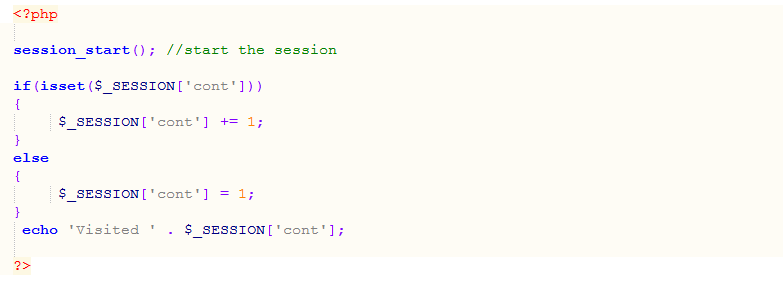
For creating a session, first we need to call a PHP session_start() function, then store our values in $_SESSION array variable.
Let us take an example which shows how to create sessions and retrieve its values.
Destroying a PHP Session
To destroy a session, call session_destroy() function.

Now, Session_destroy removes all the session data and cookies associated with the session.
Cookies
- A cookie is a small file that is saved on the user’s computer.
- Every times the same computer requests a page with in a browser, it will send the cookie too.
- A cookie is only visible to those users who have created them. Other users are not able to see its value.
- A cookie can only be read from the issued domain.
Creating a PHP Cookies
For creating a cookies, first we need to call a PHP setcookie() function, then store our values in $_COOKIE array variable.
Let us take an example which shows how to create cookies and retrieve its values.

Destroying a PHP Cookies
For destroying a cookie before its expiry time, set the expiry time to a time that has already been passed.
Let us take an example which shows the the expiration of the cookies.
