Creating live API using jQuery
1. The First Steps is to Create “Connection with the Backend “
Now we will learn , How to connect our cordovan based application with the backend to work dynamically with data.
“Backend Language” -> PHP
“Database” -> MYSQL
Have you ever thought, where you enter your ‘Username‘ and ‘Password‘ in some login form, what happens? How does it verifies your credentials details? So, let’s try to understand and implements your login verification.
Whenever you enter your username and password, the client send your username, password, and some header data to server(says PHP based server and MySQL based database). Creating live api using jquery is easy to use. There PHP receives your data and act accordingly.
An SQL query is executed to fetch the data, which is the compared with the username and password submitted.
And it send back to the result through the same gateway, then client-side also responds as per the response received (like , server response is incorrect parameters, then client side will show your username and password was incorrect/ not match error message).
Now , we will create an app which will communicate with the backend, Follow the steps:
1. write some code in php and place it in the “htdocs” folder inside the ‘XAMPP’ folder.
Example : index.php
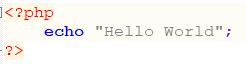
2. Open the browser and type in the address bar : http://localost or ip_address (127.0.0.1), it sholud show ‘Hello World’ message on the screen.
This means our XAMPP server is working/ running successfully.
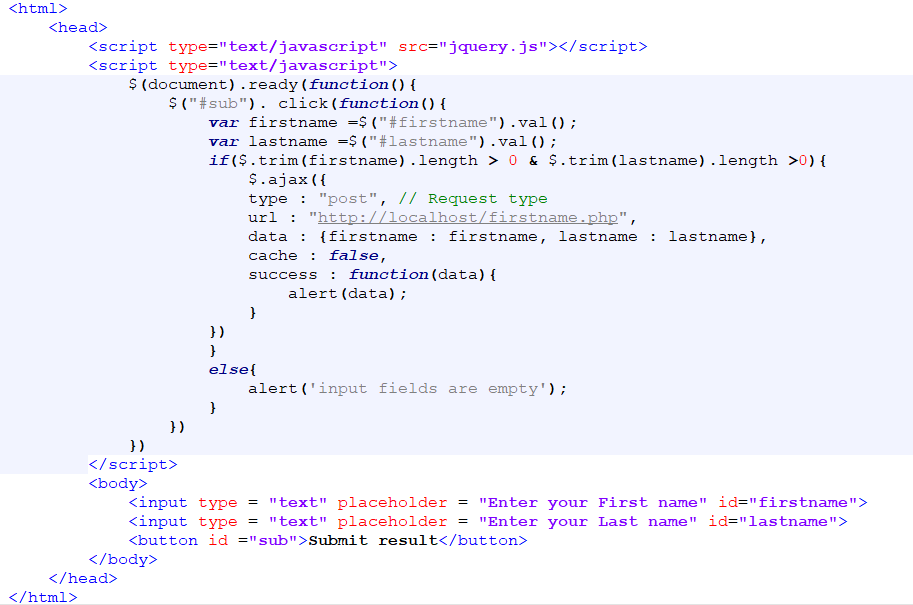
Now we are ready to develop a dynamic mobile app. Client-site script(HTML, CSS, JavaScript and jQuery).Keep the jquery.js file with index.html(or both in the same folder)
3.Here is the ‘index.html’ file code.
And the “firstname.php” file:
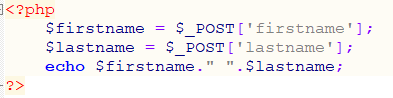
Now save this PHP file in htdocs folder. And make sure your XAMPP server is running . Run the index.html in browser and enter the input fields and check output.
“Migrating the Code to Android App”
Now we will run this code in mobile, so first connect your laptop and mobile (In which you will test your app) with the same hotspot . Then once connection is setup, open cmd in your laptop/computer, type ipconfiq and press enter. It will show the IP addresses, if your computer is connected with WIFI router then copy the IP of wireless LAN adapter WIFI, else copy the LAN IP address, Replace the localhost(URL attribute inside $.ajax function in index.html) with this IP address.
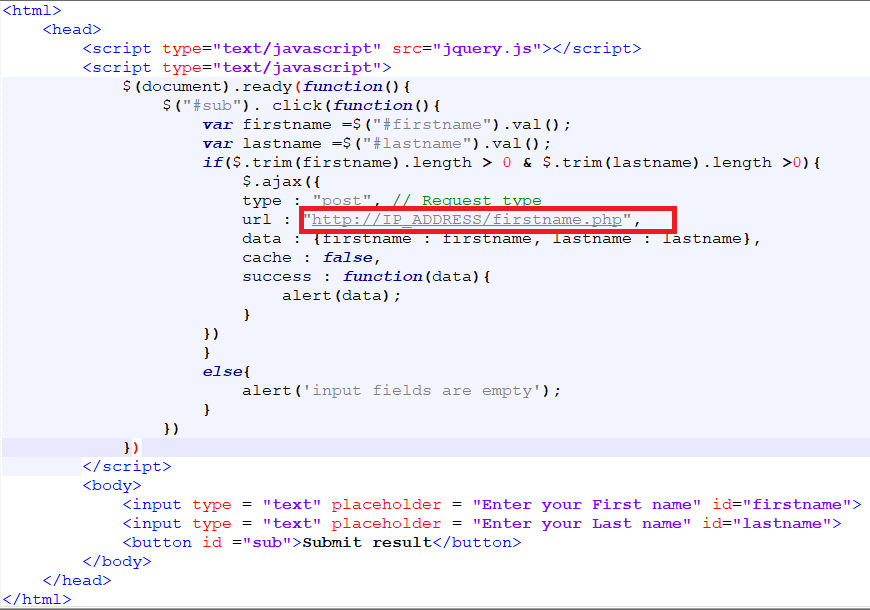
We only need the index.html file in the App, firstname.php file will remain in the htdocs folder of XAMPP directory.
Now generate the apk. Copy it to your device and check whether it is working or not.
In case it is not working, make sure your server is running or not? Whether both the devices are connected to same WiFi hotspot network or not? If connected to same WiFi network, check the IP address. Next, we will save user’s input into our MySQL database.
For this, first we will have to create MySQL database.
1. Open http://localhost/phpmyadmin in the browser.
2. Click on SQL
3.Type the following command in the text-area and click on Go.
CREATE DATABASE mydb;
4.Now open the mydb database, by clicking on it in the sidebar and once again click on SQL. Then create table using the following command.
CREATE TABLE my_table (
id int AUTO_INCREMENT,
firstname varchar(200),
lastname varchar(200)
)
It will create a table with name, my_table in mydb database.
5.Client side code i.e. index.html file, will remain the same but the PHP side code will change.
firstname.php
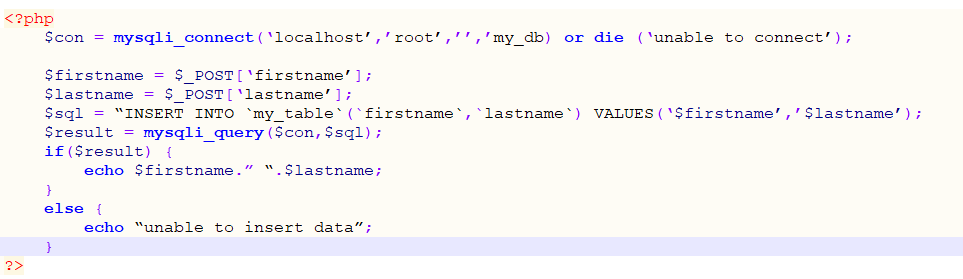
Now try it or refresh phpmyadmin page and check whether the data is inserted or not.