
How to Add Sidebar in WordPress Themes
In this blog, we will explain you that how to add sidebar in WordPress themes. A sidebar is any widgetized area of your theme. Widget areas are places in your theme where users can add the widgets of their own choice. For this, you do not need to include a sidebar in your theme, but users can add content to the widget areas through the Customizer or the Widgets Admin Panel.
To use sidebars, you must register them in functions.php. The sidebars has the following basic syntax:
register_sidebar( array|string $args = array() )
where;
- $args: Array or string of arguments for the sidebar being registered.
Register sidebar have following parameters that need to be define:
- name: It specified the name or title of the sidebar displayed in the Widgets interface.
- id: The unique identifier by which the sidebar will been called.
- description: It will display the description of the sidebar.
- class: Extra CSS class to assigned to the sidebar.
- before_widget: HTML content to prepend to each widget’s HTML output.
- after_widget: HTML content to append to each widget’s HTML output.
- before_title: HTML content to prepend to the sidebar title when displayed.
- after_title: HTML content to appends to the sidebar title when displayed.
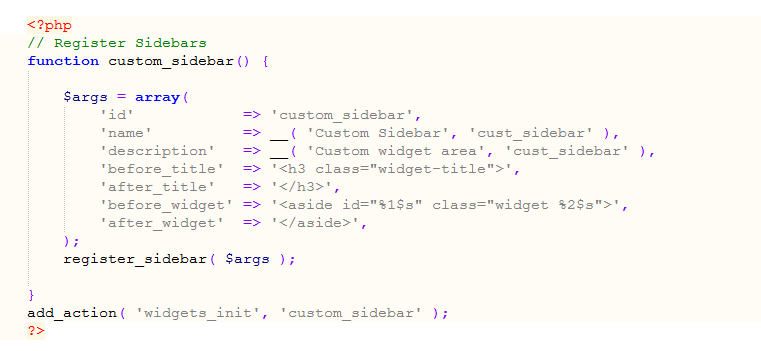
For example, create a custom sidebar named “Custom_sidebar()”. And paste the following code in your functions.php file of your theme.
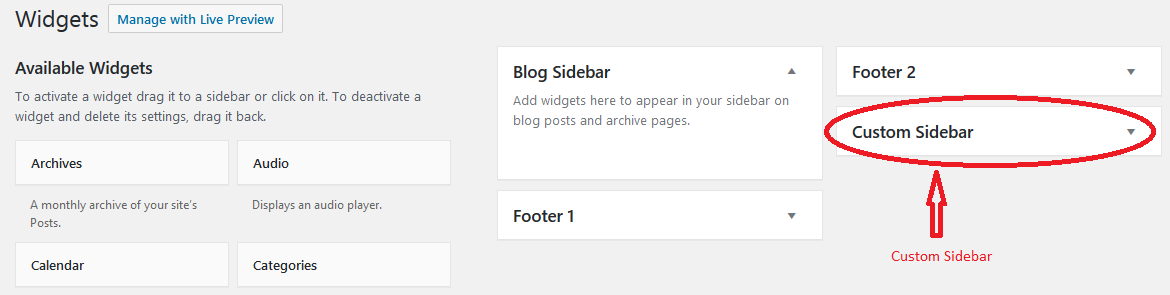
Now, go to Appearance » Widgets page, here you can see your new custom widget area.
To display this sidebar or widget in your theme, add the following code:
