
How to Create a Child Theme in WordPress
This blog will explain you that how to create a child theme in WordPress. In wordpress, a child theme is a theme that inherits all the functionality and styling of another theme, called the parent theme. Child themes are the recommended way to modifying an existing theme. Child theme is a great way to learn about WordPress theme development, preserved modifications and are used to speed up development time.
A child theme consists of at least one directory i.e; child theme directory and two files (style.css and functions.php), that we need to create:
- child theme directory
- style.css
- functions.php
To create a child theme, we need to follow the below steps:
Step1:
First, we need to create a child theme directory and place it in wp-content/themes.
Step2:
The next step is to create our child theme’s stylesheet (style.css). It must begin with the following (the stylesheet header):
/*
 Theme Name:   Twenty Seventeeen Child
 Theme URI:    http://example.com/twenty-seventeeen-child/
 Description:  Twenty Seventeeen Child Theme
 Author:       John Doe
 Author URI:   http://example.com
 Template:     twentyseventeeen
 Version:      1.0.0
 License:      GNU General Public License v2 or later
 License URI:  http://www.gnu.org/licenses/gpl-2.0.html
 Tags:         light, dark, two-columns, right-sidebar, responsive-layout, accessibility-ready
 Text Domain:  twenty-seventeeen-child
*/
Step3:
The final step is to enqueue the parent and child themes stylesheet. The correct way of enqueuing the parent theme stylesheet is to add a wp_enqueue_scripts action and use wp_enqueue_style() in your child theme’s functions.php.
Therefore, we need to create a functions.php in our child theme directory. The first line of your child theme’s functions.php will be an opening PHP tag, after which you can enqueue your parent and child theme stylesheets.

Now, the complete example becomes:
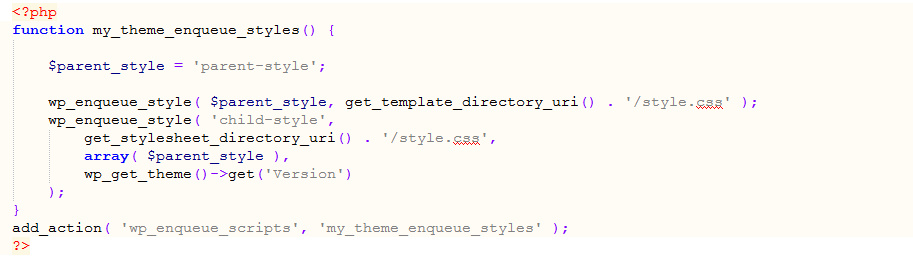
where parent-style is used in the parent theme when it registers its stylesheet.
In your child code, replace the instance of ‘parent-style’ with ‘twentyseventeen-style’, like so:
$parent_style = ‘twentyseventeen-style’;
Now, your child theme ready for activation. Go to Administration Panels > Appearance > Themes, here we can see our child theme listed and ready for activation.