How to Removed Hacked Links ?
Answer. If your website is hacked then one question would come in your mind that how to remove hacked links? Hacked links means a hacker has made new pages on your website, regularly including spammy/malicious words or links. This is very harmful because it means that your site has been infected long enough for the hackers to do damage. not to worry about that , here we will explain you that how to remove hacked links from your website. Please follow these simple steps to remove hacked links from your website:
Step 1. Go to google search engine and search with the domain name like “site:example.com” (replace example.com with your website name) .
Step 2. You will found the links like in Stunning Format language .

Step 3. After that find the hacked links , open Google Search Console -> https://www.google.com/webmasters/ and sign in with your gmail id.
click on the sign in button -> and then click on start -> then enter your gmail id and password.
Step 4. After that login , The page is open
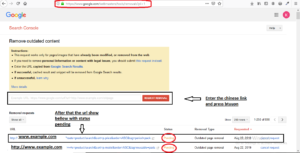
Step 5. Now open Removal Tool -> https://www.google.com/webmasters/tools/removals?pli=1 -> login it and then the paste the copy link and submit for request removal, this removal link works in 24 hours.
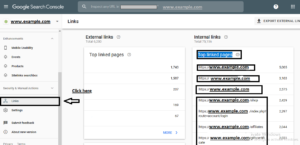
Step 6. For Step 3 , scroll down the page , you will find in left hand side “Links” option -> click it.
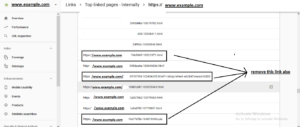
Step 7. You will find more hacked link in format ->
https://www.example.com/d280f997-109817561.html
https://www.example.com/e014aaad-100620334.Lsa
Remove this links also for all the “Top linked pages“.